Design, run, and test agents in one workspace.
Call real GitHub and Hugging Face MCP tools seconds after you download — no setup, no keys to wire up first. Then point it at your own APIs, databases, and internal services. Compose tools, build harnesses, and orchestrate agents across all of them.
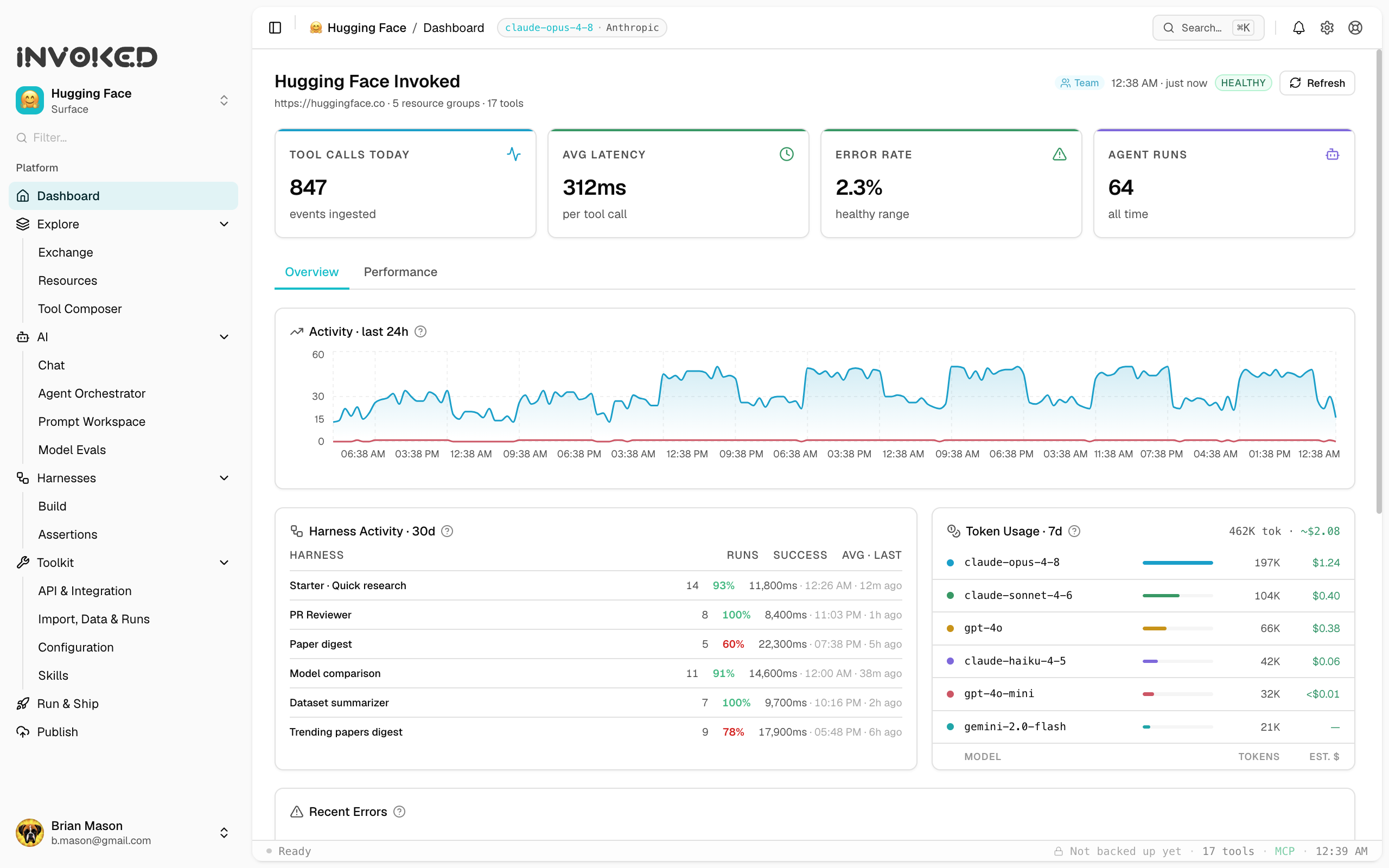
Works with the tools you already use
Why teams build on Invoked
Ships with GitHub & Hugging Face tools wired up. Call real tools before you’ve touched a config file.
Local-first by design — keys, configs, and run history stay on your machine. We can’t see them.
Every run shows its full trace: reasoning, tool calls, tokens, timing. Prove what happened.
Turn winning runs into reusable skills with version history and success data. The good ones rise.
What it does
A full workbench for agentic work.
Orchestrate agents, compose tools, evaluate the results, and switch between surfaces without losing context. Built for teams who run real agentic work and want every run to make the next one better.
Connect
Bring your models, tools, and MCP surfaces into one workspace.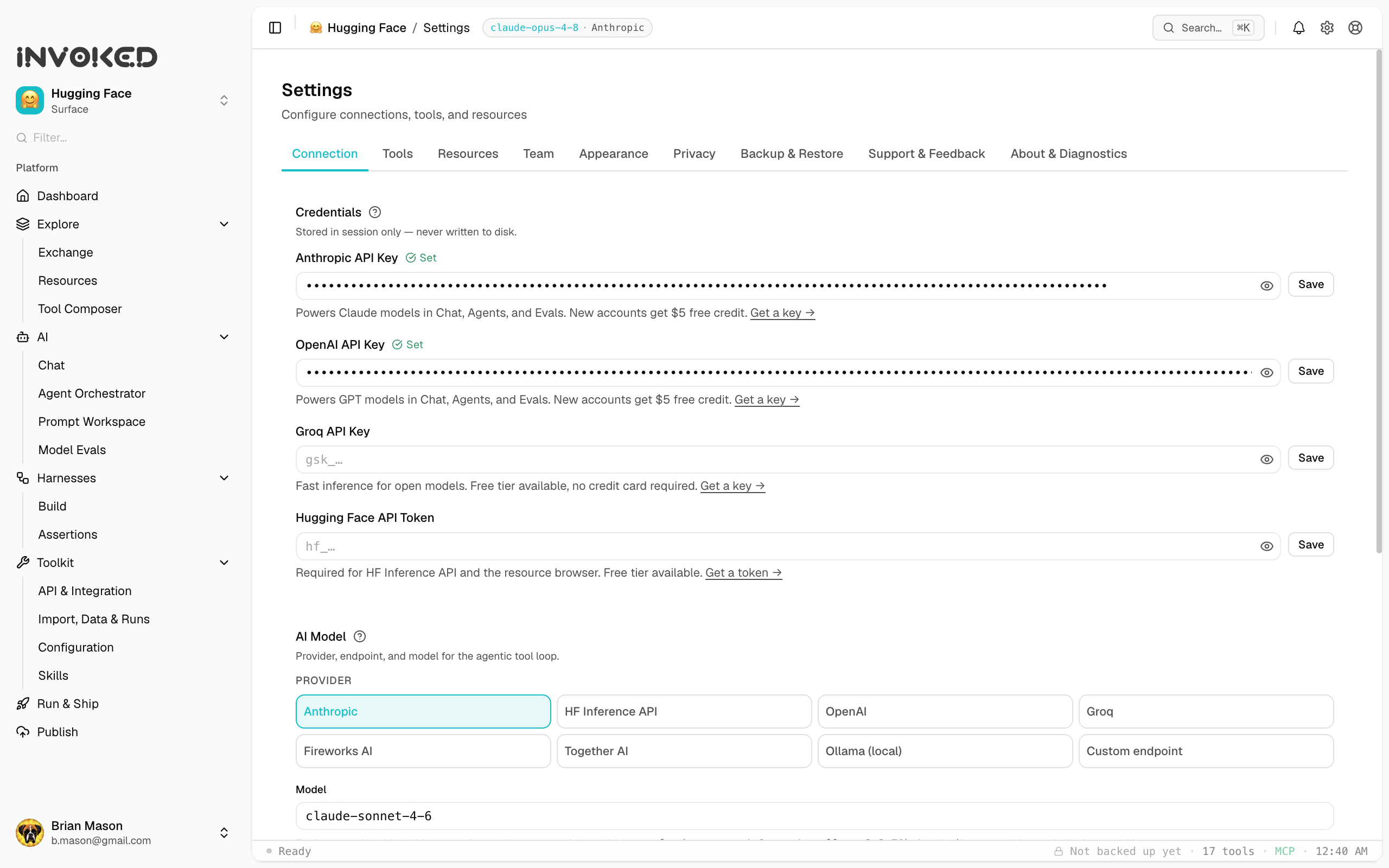
Create
Build agents, prompts, skills, and multi-agent harnesses.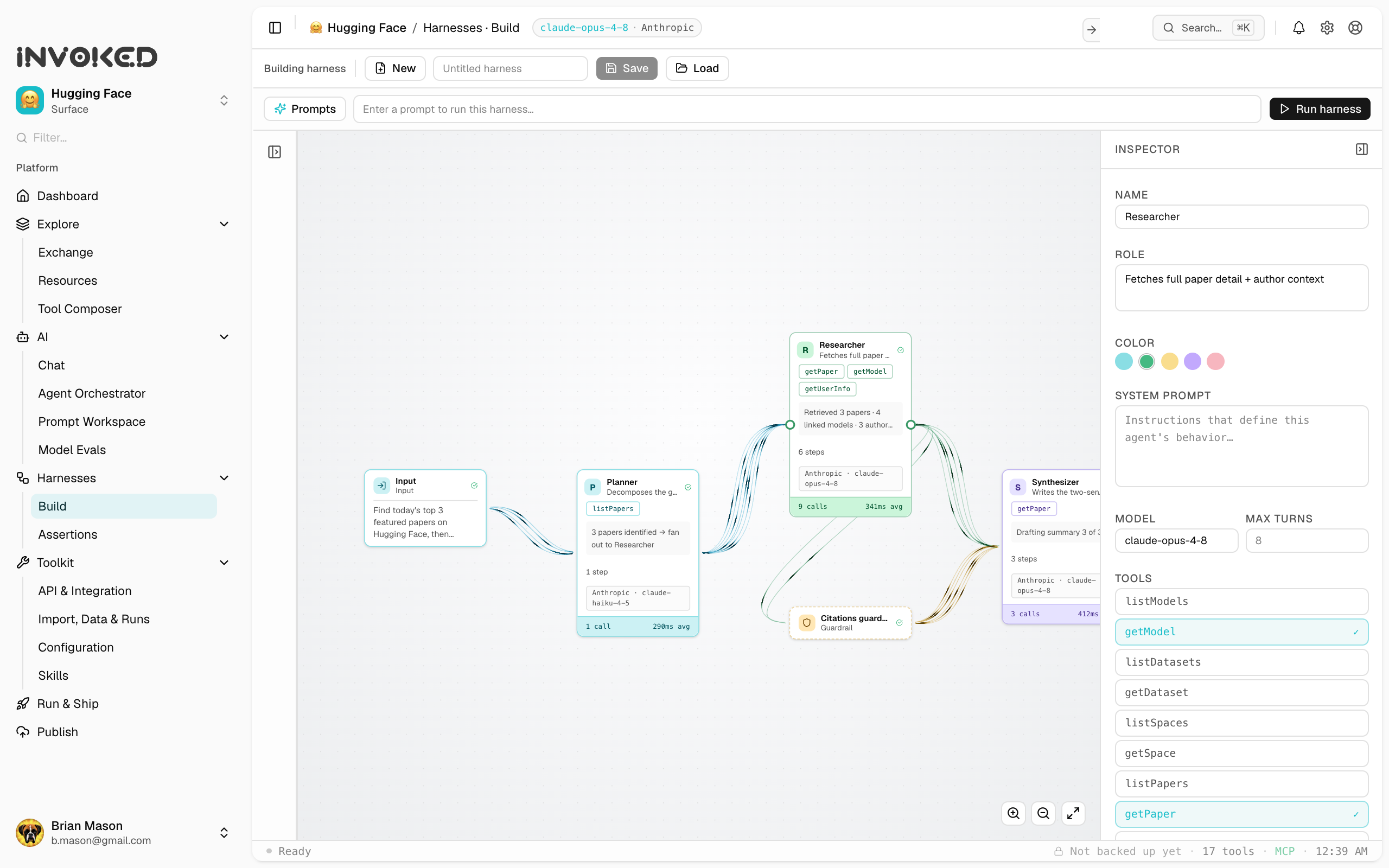
Run & Prove
Watch agents work, then prove a change is actually better.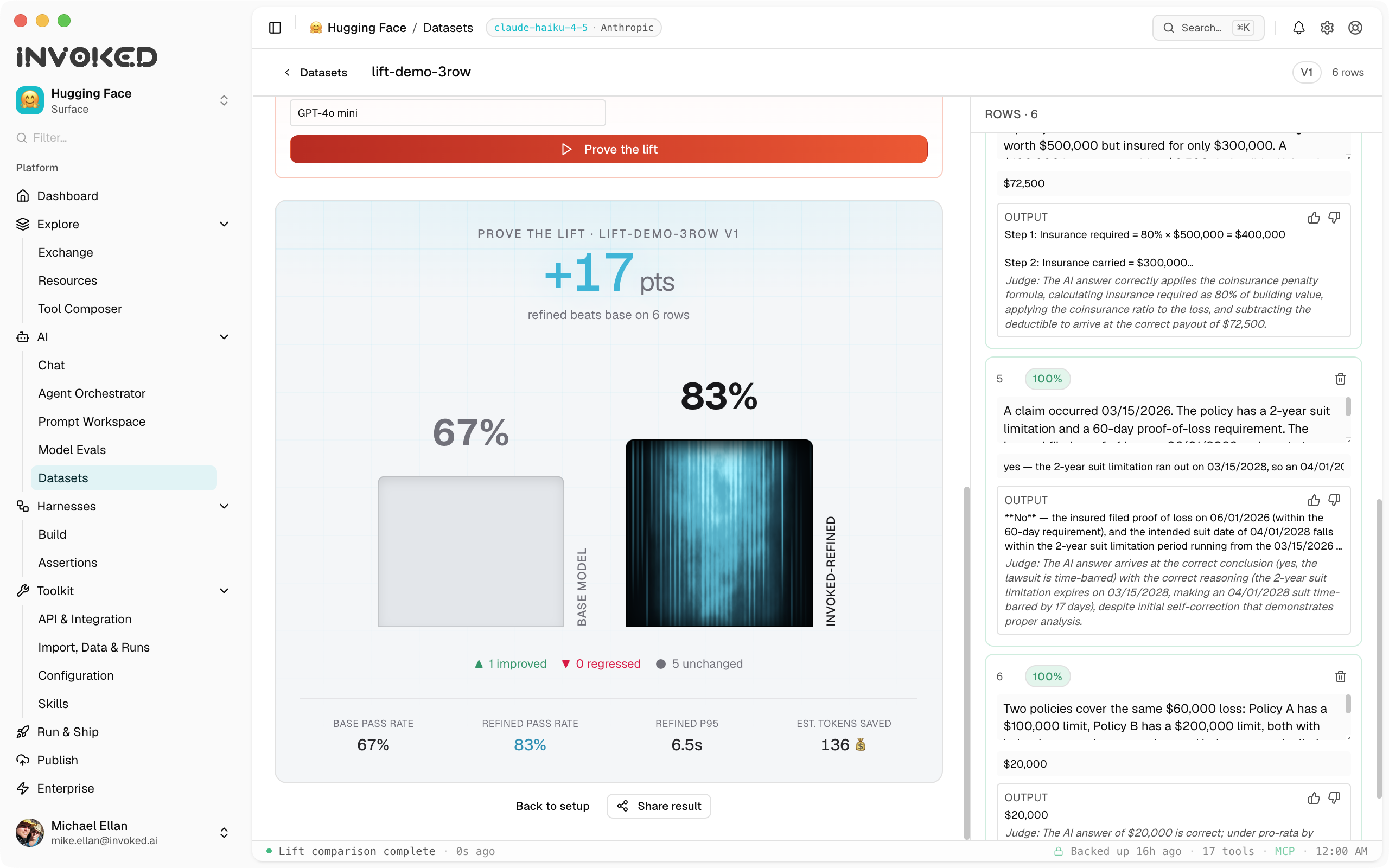
Ship
Publish agents as governed endpoints, portable code, or hosted on Invoked.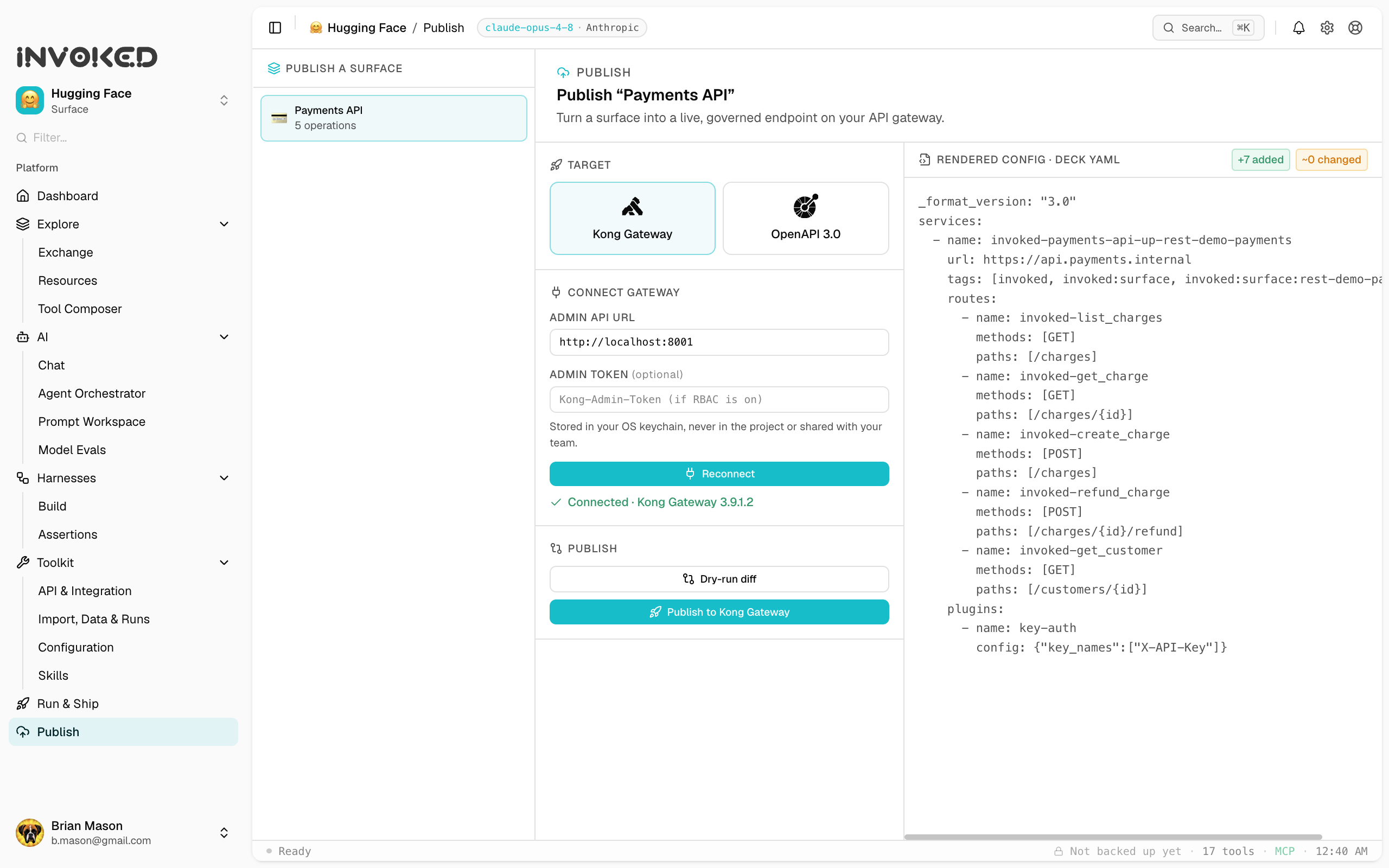
AI enablement
Wherever you are on the AI journey, this is your on-ramp.
Every organization is somewhere on the same curve right now, the way everyone once moved from on-prem to cloud, or from before the internet to after it. The ones who move first compound a lead. The hard part is rarely the model. It is turning the systems you already run into something agents can actually use.
This is one of Invoked's strongest capabilities. It takes the APIs you already have and quickly surfaces sensible skills, efficient tools, and ultimately harnesses your team can build on today. No rebuild, no rip and replace, and above all no lift and shift. You meet the journey where you stand and move up the curve in days, not quarters.
The AI enablement curve
and where Invoked plays a roleWith Invoked
01 / 06Connect a first API and call a real tool in minutes.
- Point Invoked at an API or MCP server and it becomes a usable surface.
- Watch an agent make its first real tool call, not a mock.
- Browse every endpoint and try it interactively before you wire it in.
- Bring your own model key, or use a free option to get moving.
- See the full request and response for every call, in plain view.
- No setup call and no account required to get there.
Invoked moves a team from wherever it starts toward AI-native, one proven skill at a time.
Why it is a force multiplier
Your existing APIs and internal services become agent-ready surfaces without a rewrite. The investment you already made starts paying off again.
Skills and harnesses turn a working run into something the whole team can reuse, so AI capability spreads past the handful of people who can prompt well.
Each skill, tool, and eval makes the next one faster to build. The early lead is the hardest for others to close.
Why it compounds
It gets better while you sleep.
Most tools forget the moment a task finishes. Invoked keeps the trace, the skill, the eval, and the success data and scopes it to your workspace. The system reads its own results: the prompts that work get promoted, the tool sets that hold up get reused, the runs that fail get flagged. Nobody has to tune it by hand.
So the math inverts. Most software is worth most on day one and decays from there. Invoked is worth the least on day one and climbs every week after, as success rates rise, latency drops and the library of proven work grows. Your return on investment increases all on its own. It is not a portable export. It is a moat that compounds.
A workspace over 12 weeks
compoundingWhat accumulates
workspace-scopedSuccessful runs become reusable skills with version history and success rates. The good ones surface on their own, the rest fade.
The compositions that hold up under real load get reused, ranked, and shared across the team automatically. No manual curation.
Every model swap and prompt edit is scored against the last one, so the workspace only keeps the changes with proven success.
For solo developers
Invoke a whole tech stack in seconds.
Working solo means juggling a dozen tools at once. With the surface switcher, your GitHub, your database, your internal API, and every MCP server you use are one keystroke apart. Flip between entire ecosystems without losing context, and let the agent reach across all of them in a single run.
Each surface keeps its own tools, keys, history, and skills. Switch from one stack to the next instantly, nothing to reconfigure.
Connect Anthropic, OpenAI, Groq, Ollama, or a custom endpoint. Free key options get you running without spending a cent.
Runs, traces, and credentials stay in local SQLite. Personal history backs up encrypted to our cloud storage, which only you can read.
Turn a good run into a one-click skill. The library you build follows you from project to project and keeps getting sharper.
Download, drop in an email, and the pre-configured workspace is ready. No credit card, no setup call, no sales motion.
The trial is the real product: harnesses, evals, flow canvas and run history. Everything is included for ten days and fifty runs.
For a workspace that gets more useful every single week. Unlimited runs, every provider, all yours.
Built for teams
Your team's knowledge, in one place and under your control.
Share surfaces, skills, and reference runs across your team. Roles and access stay in your hands. Run history lives locally and backs up encrypted, so nothing leaves your machines that you did not send.
Surfaces, skills, and tool sets sync to the team. New members start with everything that already works.
Admins manage seats and access. Claim-link onboarding means the buyer never has to be a power user.
See spend, success rates, and top skills across the org. The CFO view and the engineering view from one source.
Conversations, keys, and run history stay in local SQLite. Only anonymous usage metrics ever leave the device.
Native builds for macOS, Windows, and Linux, signed and notarized for a clean install through IT.
White-label, SSO passthrough, managed update channels, and an SLA when you need procurement to say yes.
White-label
Ship Invoked as your own product.
Put your logo, colors, name, and domain on Invoked, for internal rollouts your own teams run and for instances you hand to your customers as a native workspace for your platform. Your API arrives already composed into surfaces, tools, and skills, so the people building on your platform start from working examples instead of a blank page and a PDF.
It’s the developer experience your customers wish every API shipped with, and the kind of transparency that earns trust: every tool call, trace, and result in plain view.
And we don’t disappear after the branding. We keep hosting the installer and the analytics, maintained and updated, so your team isn’t left running infrastructure. If you’d rather own either piece yourself, you can — the point is the choice is yours, not an obligation we hand off.
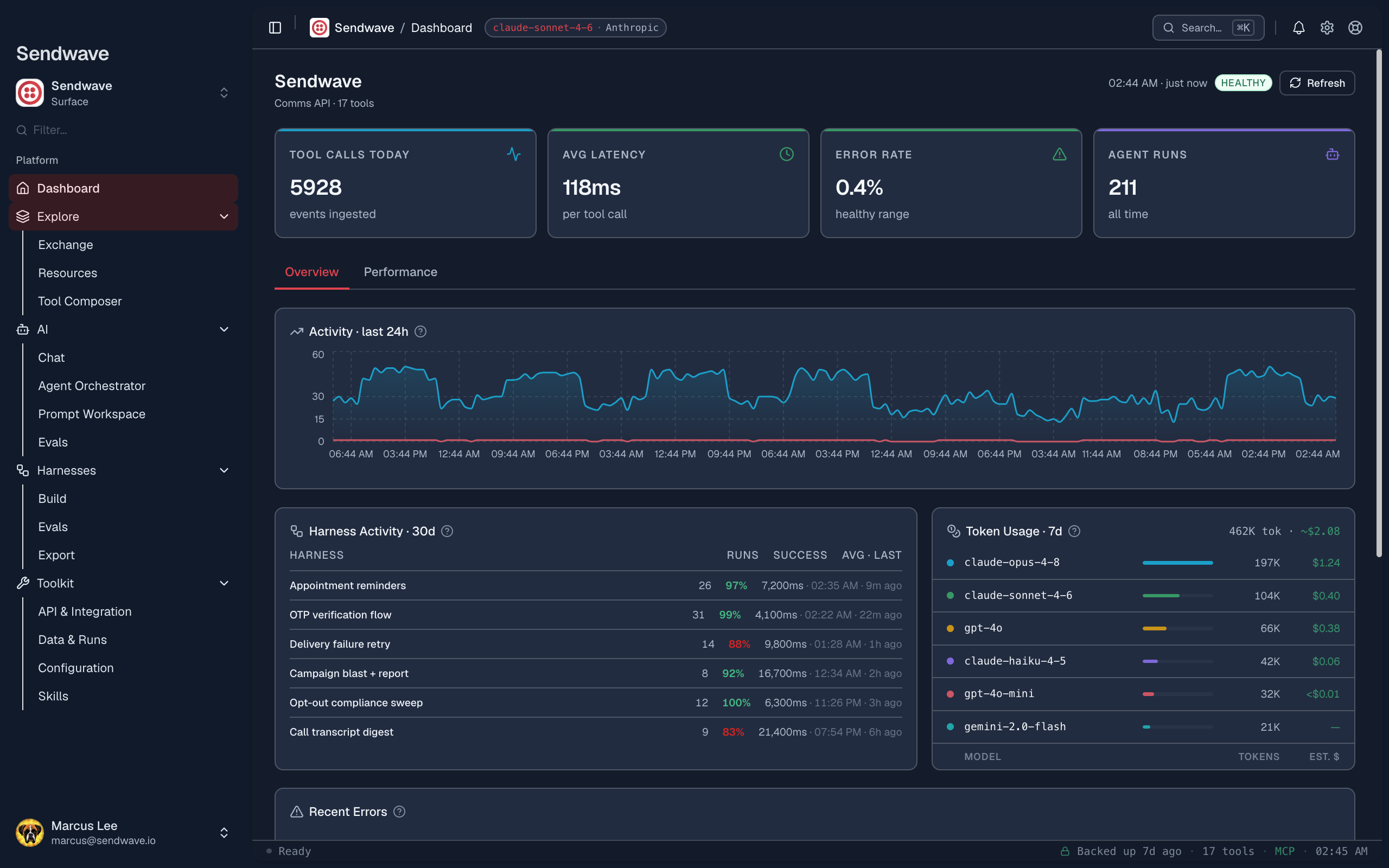
What white-label gives you
your brand, your customersYour logo, colors, app name, and custom domain, for both internal teams and customer-facing instances. They see your product, with Invoked as the engine underneath.
Our knowledge base and documentation are headless-driven, so they render under your brand and domain, editable by your team, no forking or copy-paste.
Ship your API pre-composed into surfaces, tools, and skills. New developers reach a working call in minutes, not after a week with the docs.
Every tool call, trace, token count, and result is visible. Your customers can see exactly what ran, which builds the trust integrations usually lack.
A branded native app in your customers' hands keeps your platform one keystroke away, every day, not buried behind an integration backlog.
SSO and SAML passthrough, managed update channels, role-based access, and an SLA. Built to clear procurement and security review.
Their runs, traces, and keys stay on their machines. You deliver the experience without becoming the custodian of their data.
White-label doesn't mean we hand you the keys and walk away. We host the installer and the analytics, and keep them running and updated. Prefer to self-host either one? You can — but the default is we carry the operational load, not you.
When you’re ready for production, we’ll host it.
Everything you refine on the desktop can run as a governed, hosted endpoint on our gateway: metered, guarded, and eval-proven, with your provider keys in our vault and never on the wire. Prove the lift on your data, then serve it.
Explore Enterprise hostingThe Invoked Exchange
Browse what already works.
The Exchange is a public directory of surfaces and skills with real performance data: success rates, latency, and how many workspaces actually run them. Find a verified MCP server or a battle-tested skill, then bring it into your own workspace in one move.
GitHub
342 workspacesSuccess
P50
P95
Runs
Tools
Verified
ROI
What does “agent-ready” cost without Invoked?
The first build is expensive. The real cost is everything after, because every API change starts another rebuild cycle. These estimates already assume your engineers are using AI copilots, which speeds the coding but not the weeks of architecture, prompt work, and integration testing.
What making one API agent-ready takes
per surfaceYour data never leaves your machine. Conversations, run history, and keys are stored locally in SQLite. Only anonymous usage metrics are sent to analytics.
vs. building it yourself with an AI coding agent
Invoked Team, $25 a seat a month
At $100/hr, payback is 15 minutes of one engineer's time. Every month after is capacity back on the roadmap.
Get Team, $25/seat/mo →Conservative estimate. Assumes engineers already use AI copilots, 60% utilisation because integration work is rarely one person's full focus, iteration savings of 4 hours per update cycle vs. a full rebuild, blended rate default $100/hr.
Pricing
Free to start, simple to scale.
Try the full app free. Pay when your team is ready to go unlimited.
10 days, 50 runs, no credit card.
- Full native app for Mac, Windows, and Linux
- Hugging Face workspace pre-configured
- No API key required to start
- Run history and full trace
- Skills and prompt workspace
Or $149 a year, two months free.
- Everything in the trial
- Unlimited runs
- All 5 LLM providers
- Full evals and model comparison
- Agent harness canvas
- Skill authoring and export
- API and OpenAPI panel
Or $249 a seat a year, two months free.
- Everything in Solo
- Shared workspaces
- Team skill library
- Config and credential sharing
- Role-based access control
- Org-wide analytics
- Dedicated support
Solo is free for verified students and educators. Classes and clubs get 40% off a Team account.
One agent execution, or one back-and-forth in chat that makes tool calls. Browsing the UI, editing skills, and reviewing run history do not count.
The free trial gives you 10 days and 50 runs with no credit card and no API key required to start. Upgrade to Solo or Team when your team is ready for unlimited runs and full features.
Runs are stored locally in SQLite on your machine. Only anonymous usage metrics go to a privacy-preserving analytics service. No run content ever leaves your device.
FAQ
Questions, answered.
- Invoked is a native desktop app for Mac, Windows, and Linux that turns any API into a fully-equipped AI agent environment in under a minute. It is MCP-native (Model Context Protocol) and local-first: your prompts, keys, and runs stay on your machine. You connect a surface (an MCP server or REST API), and Invoked gives you chat, an agent orchestrator, a visual harness builder, evals, and run history around it.
- Invoked is free to try for 10 days or 50 runs, no credit card required. After that, Solo is $15 per month or $149 per year, and Team is $25 per seat per month or $249 per seat per year with a 3-seat minimum. Annual billing includes two months free on both Solo and Team.
- You can use the full app free during the trial (10 days, 50 runs, no credit card). The public Invoked Exchange — the directory of MCP surfaces, skills, and tools — is completely free to browse and is hand-curated by developer advocates.
- The Invoked Exchange is a free, hand-curated public directory of MCP surfaces, agent skills, and tools, each with real-world performance data. You can search it, add resources to a loadout, and invoke them straight into your workspace with one click using the "Invoke Me" action.
- Yes. Invoked is bring-your-own-key and provider-agnostic. It works with Anthropic Claude, OpenAI, and other providers, so you can switch the model powering Chat and the Agent Orchestrator without changing your tools or code.
- Yes. Invoked is local-first — your prompts, API keys, and run history stay on your device. Secrets are stored in your operating system keychain. Optional community performance metrics are anonymous and opt-in: they never include your prompts, data, keys, or which exact tools you run.
- Yes. The Team plan adds role-based access, claim-link onboarding (the buyer does not have to be a power user), shared skills and surfaces, and workspace-scoped stats. Teams are the primary way organizations adopt Invoked.
- Invoked ships as a native desktop app for macOS (Apple Silicon and Intel), Windows, and Linux (.deb and .AppImage). There is nothing to host and no server to run.
- This deserves a thorough answer, so we wrote a dedicated briefing for architects and solutions engineers that lays out precisely what Invoked is, what it is not, and exactly where your data lives and travels. Read it at invoked.ai/invoked-for-architects.html — it is written for security and platform review, in plain language with no marketing fluff.
Get started with Invoked
Connect your own keys, build your own skills, and run agents on your own data. Free 10-day trial, no credit card, no account required.
Available for macOS (Apple Silicon & Intel), Windows, and Linux.