Publish
Turn a surface into a live, governed endpoint on your API gateway. Publish to Kong Gateway in a few clicks, or export a portable OpenAPI 3.0 spec for Postman, SwaggerHub, AWS API Gateway, Azure APIM, and more. Invoked stays the source of truth.
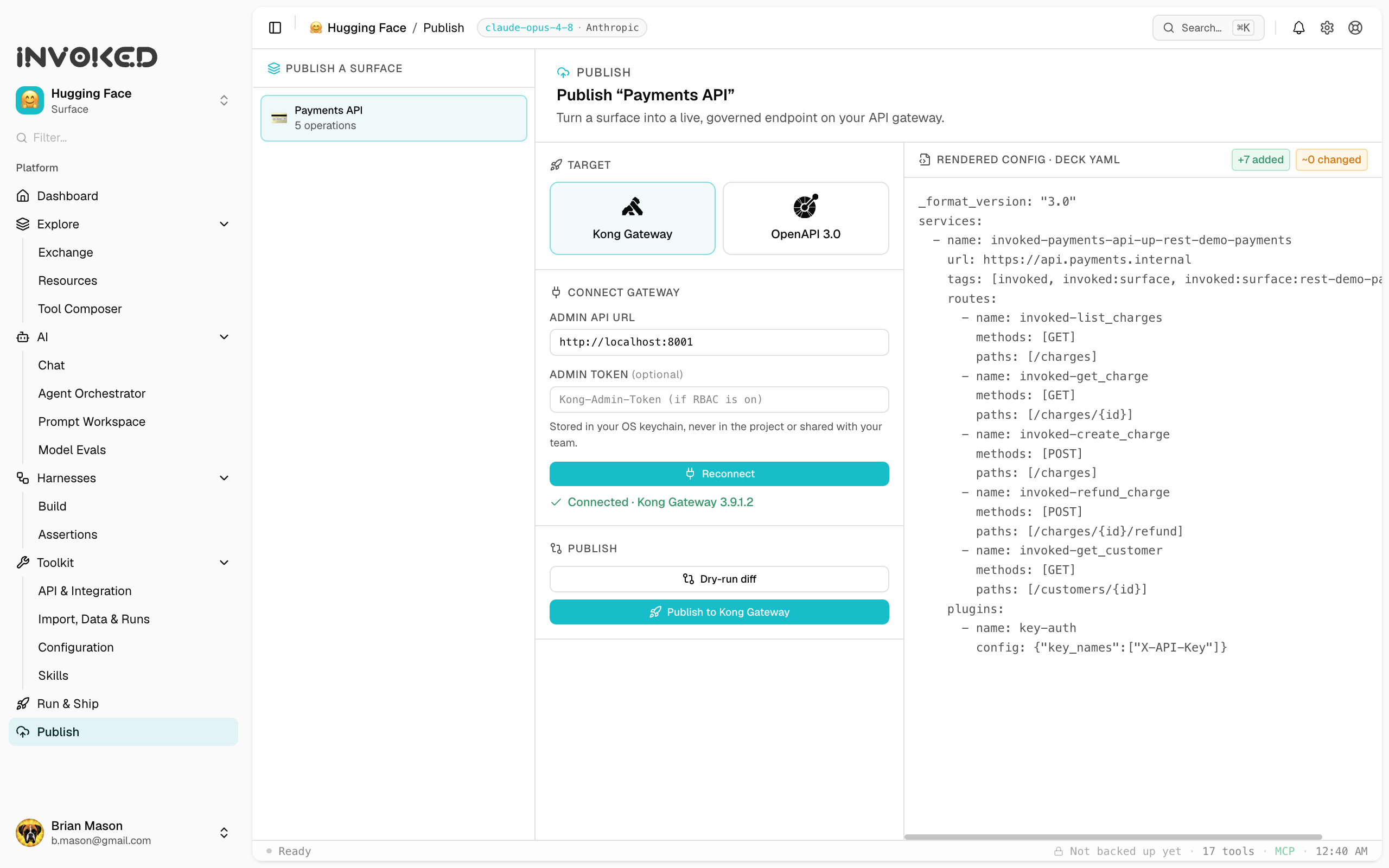
You connected a surface, built with it, and tested it. Now put it in production. Publish is the third act: take a surface and stand it up as a real, governed endpoint on your API gateway — or export it as a portable spec that imports anywhere. Invoked owns the push; you don't hand-edit config or run a CLI.
Open it from Publish in the left sidebar, directly under Run & Ship.
How it works
Publish is source-scoped: you pick a surface, pick a target, and Invoked renders the surface into that target's native shape.
- Pick a surface. The left rail lists every surface that can be published — a REST surface with tools, or an HTTP endpoint. (A surface that runs a local stdio MCP server can't be proxied by a gateway, so it's shown as not publishable, with the reason.)
- Pick a target. Choose Kong Gateway (a live push) or OpenAPI 3.0 (a portable file). More targets are on the way — the same surface renders to each.
- Preview. The right pane shows exactly what will be created, rendered from the surface. Nothing is hidden.
Whatever a target can't represent is reported as skipped, with a reason — never dropped silently.
Publish to Kong Gateway
Kong is a live control plane, so publishing is a connect → preview → dry-run → apply flow.
- Connect. Enter your Kong Admin API URL (for a local gateway,
http://localhost:8001) and, if RBAC is enabled, an admin token. Click Connect — Invoked verifies the connection and shows the gateway version. The token is stored in your OS keychain, never in the project and never shared with your team. - Preview. The right pane renders the surface as deck-format YAML: a Service (your upstream), a Route per tool, and a key-auth plugin if the surface uses API-key auth.
- Dry-run diff. Click Dry-run diff to compare the rendered config against what's already on the gateway — added, changed, and removed, scoped only to objects Invoked owns. This is your safety gate before anything is written.
- Publish. Click Publish and Invoked pushes the config to Kong's Admin API. Your Service, Routes, and plugin appear in Kong Manager, and the proxy starts routing.
What renders where
| Surface concept | Kong object |
|---|---|
| Endpoint (base URL) | Service |
| Each tool (path + method) | Route |
| API-key auth | key-auth plugin |
Every object Invoked creates is tagged (invoked:surface:<id>), so diff and apply only ever touch Invoked-owned config — your other gateway setup is never affected. Re-running a publish is idempotent: publish again after editing the surface, and only the differences change.
Credentials stay put
Invoked pushes configuration, not secrets. The rendered config references a credential's name, never its value. Your gateway admin token lives in the OS keychain; the surface's own auth material stays where it already is. Nothing sensitive travels in the config or gets shared.
Export an OpenAPI spec
Not every destination is a live gateway. The OpenAPI 3.0 target renders the surface as a standard spec you can take anywhere.
- Pick the surface and choose the OpenAPI 3.0 target.
- The right pane renders the spec — paths and methods from your tools, plus a security scheme if the surface uses auth.
- Download the
.openapi.jsonfile, or Copy it to your clipboard.
Import it into Postman, Insomnia, SwaggerHub, AWS API Gateway, Azure API Management, or any tool that speaks OpenAPI. One surface, and it fits nearly everywhere.
Invoked stays the source of truth
Because publishing renders from the surface, the surface is the single definition you maintain. Change a tool, re-diff, re-push — across every gateway you publish to. The gateway governs the endpoint; Invoked keeps the definition, the run history, and the agent context that a gateway UI can't. Editing happens in one place, and it flows outward.
From connect to publish
The full loop:
- Connect a surface — your API or MCP server.
- Build and test with it in chat, harnesses, and evals.
- Publish it to your gateway, or export the spec.
- Re-publish whenever the surface changes — Invoked is the upstream.
That's the path from a connected API to a governed, production endpoint, without leaving Invoked.