Run & Ship
Run a harness live and watch it work, then grab portable integration code — a React component, a TypeScript client, and more — that your team can drop straight into your app. Bring your own key; it runs anywhere.
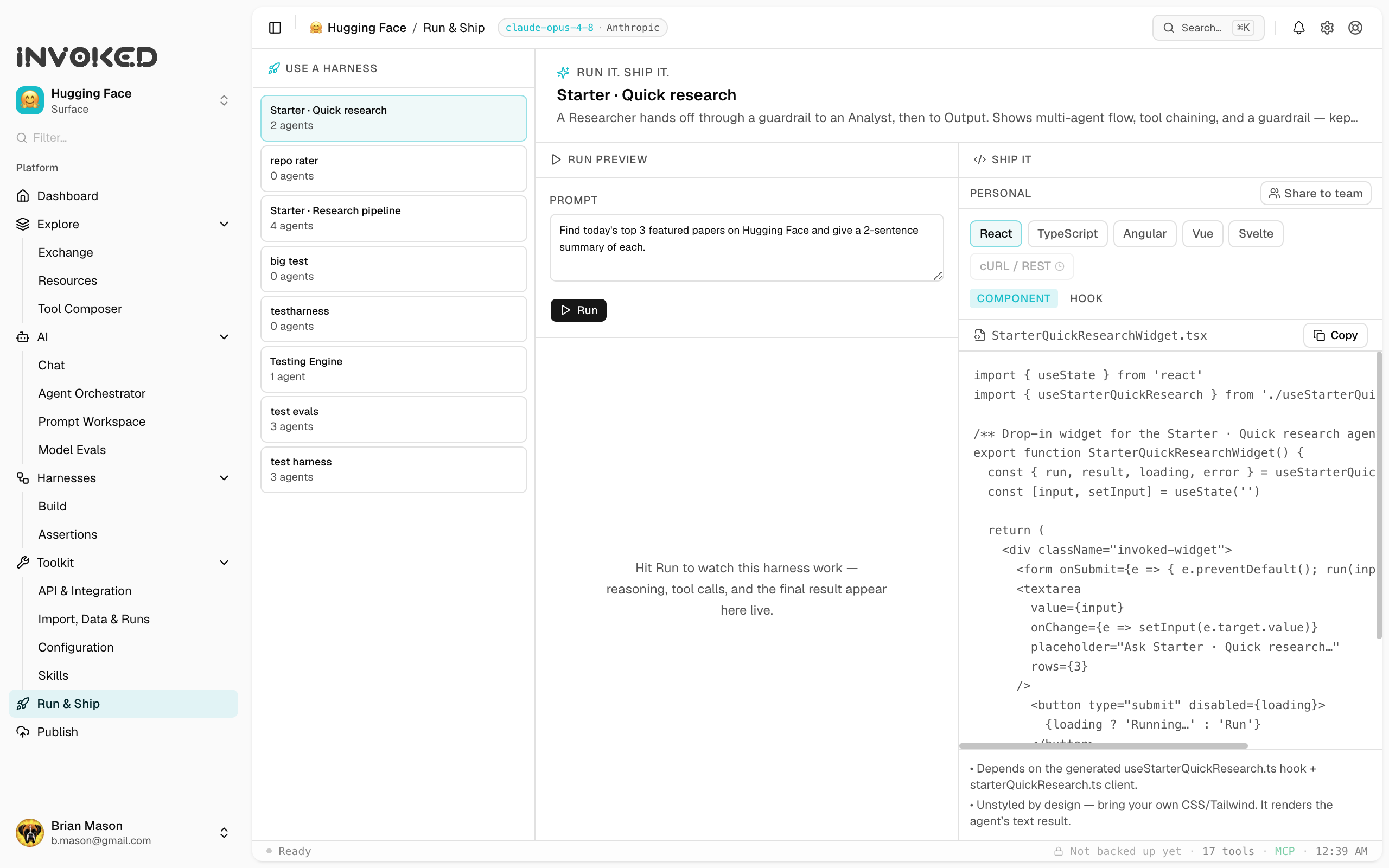
You built a harness. Now what? The Run & Ship surface is the answer: run your harness live to see it work, then take portable code your team can ship. It closes the gap between "I built an agent" and "it's running in our product."
Open it from Run & Ship in the left sidebar. Pick a harness, and the surface splits in two: Run preview on the left, Ship it on the right.
Run preview
The left pane runs your harness the same way the canvas does, so what you see here is what you get in production.
- Inputs. If your harness declares typed parameters, you get a form — one field per parameter, with types and required markers. If it doesn't, you get a simple prompt box seeded with the harness's input, ready to run.
- Run. Hit run and watch it work: the agent's reasoning, tool calls, and results stream in live, then a final result card lands at the end. This is the "it actually did the thing" moment, in plain view.
- Honest about keys. Running an agent needs your model key (and some tools need their own). If something's missing, Use it tells you exactly what and where to add it — never a silent failure.
Typed parameters
A harness can declare typed inputs — name, type (string, number, boolean, or a set of options), whether they're required, and a default. Use it renders them as a form so anyone can run the harness without editing a prompt, and the same types flow straight into the generated code's function signature. Simple by default, precise when you need it.
If your harness's input prompt already uses {{placeholders}}, Use it detects them and offers them as parameters automatically.
Ship it
The right pane turns your harness into real, runnable integration code. Pick your framework and the artifact you want, and copy it into your app.
- Frameworks. React and TypeScript are available today, with Angular, Vue, Svelte, and a REST/cURL option on the way. You choose how your UI ships — Invoked doesn't force a framework on you.
- Artifacts. For React, a drop-in component or a hook; for TypeScript, a self-contained client.
- It really runs. The generated code mirrors how the harness actually executes — it calls the model, dispatches the harness's tools, and loops until done. It's yours to own and deploy.
Bring your own key
Generated code is self-contained and uses your keys — your model API key, plus any token a tool needs. There's no Invoked service in the path and nothing to lock you in: the code runs wherever you run it. Keep keys server-side in production, as you would any secret.
Share it with your team
On a team workspace, you can share a harness straight from Use it. Sharing shares the harness itself — so a teammate opens it in their own Use it and grabs the snippet for their framework. The front-end engineer takes the React component; the platform engineer takes the TypeScript client; everyone works from the same source of truth. Agent know-how compounds across the team instead of living in one person's scripts.
From build to ship
The typical flow:
- Build a harness on the canvas.
- Use it — run it live, confirm it does what you want.
- Ship it — copy the code for your framework into your app.
- Share it — push the harness to your team so everyone can use it.
That's the loop: design an agent, see it work, and put it in front of real users.